When you’re running an auto shop, you’re managing customers, operations, inventory, and so much more. You’re busy enough without having to worry about late payments or drowning in paperwork. You need to reduce as much of the workload as possible, and that includes implementing an invoicing system that takes all the stress out of billing and payment collection.
So, let’s explore how auto repair invoice software can help you run your auto shop smoothly.
How do repair shops print and send digital invoices?
Auto repair shop invoicing software helps turn repair estimates into an invoice in a single click. It fills in any missing details, for example, mileage or approvals, and then sends out the digital invoice by email or text to the customer. Customers get a secure link to pay however they like, either via cards, online, or in person.
It is a great way to help you create, manage, and keep track of all your invoices, because if you have 5-7 customers, it is easy to manage manually. But if you have more customers with varying timelines, payment schedules, keeping track of invoices and payments can turn into a nightmare.
In case your customers request a physical printed copy, the software allows the shop to easily print the final invoice from the system. They can share the copy with the customer for their record.
What are the benefits of using invoicing software for your auto repair business?
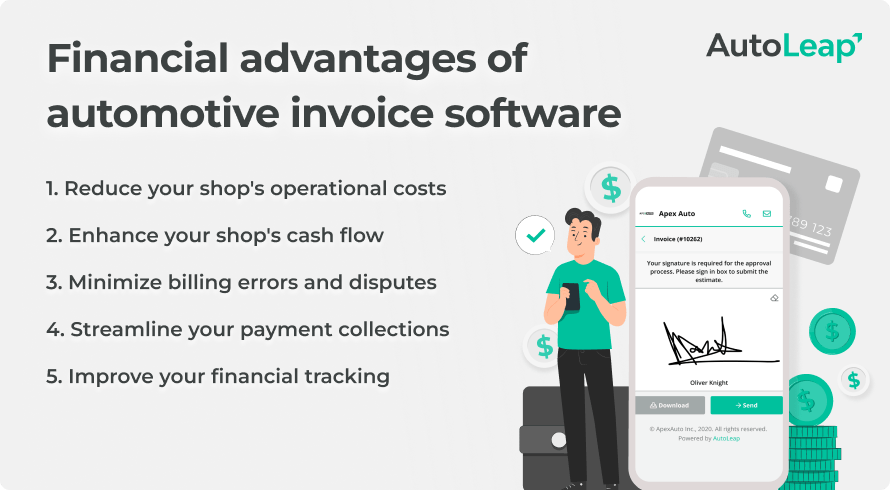
The automotive invoice software helps your shop stay organized and profitable. There are many ways it helps you save both time and money.
1. Get paid faster
When you’re able to create invoices faster, you get paid faster. Your technicians can save time on manual entry with 1-click invoicing, and simply email or text the final invoice to the customer with a secure payment link. Your customer will click and make the payment right there and then without any delays. This also means a healthier cash flow.
2. Automated reminders and tracking
Customers get notifications if there is an upcoming payment or an overdue payment. Again, this ensures you don’t miss payments, and you don’t have to keep a manual track of who has paid and who hasn’t. Your staff doesn’t have to send manual messages reminding customers of late payments.
3. Flexible payment options
Your customers also get an option to pay however they want. Whether they want to pay with a credit card, debit card, bank transfer, or even in person. It gives them the option to choose their preferred payment method.
4. Integration with accounting tools
Your invoicing software allows you to integrate with accounting tools like QuickBooks Online. This means you can sync every payment and customer record/information directly to your QBO account for a seamless accounting experience. It removes any double-entry or other errors that can happen in manual work. This way, you can keep billing, payments, and taxes organized automatically.
5. Reduced manual work
With an invoicing software, you can reduce dependence on manual labor and stacks of papers. Paper invoices can get lost, and that just means extra headache and operational work. You can reduce that operational cost with an invoice software that allows your team to focus on more strategic and productive work instead of being buried under invoices and late payments.
How does invoicing software improve financial management?
When invoices are going out on time, you can track payments and also get paid on time, and your shop’s overall financial position improves. It goes beyond just a steady cash flow. You get financial insights that help you manage your shop better. With a proper invoicing system in place, you can:
- Match payments with invoices for clear records, which would help later on.
- Break down profit by labor, parts, or jobs so you get a clear picture of where you’re spending the most money.
- Generate reports that help with taxes and understanding the shop’s performance.
- Create a simple billing experience for customers, reducing confusion regarding where to pay, how much to pay, etc.
- Use the data from this invoice software to improve your shop’s processes.
How can repair shops minimize errors in estimates and invoices with software?
Using auto repair invoicing software helps shops reduce errors at multiple points in their process. Right from creating estimates, to invoicing, payments, and then even record keeping.
For example, the software can
- Automatically calculate all the costs involved. From the labor, to the parts, discounts, and any applicable taxes or other charges.
- Easily convert all estimates into an invoice in 1 click so your technicians won’t have to do any manual work, which could lead to errors.
- Help technicians carry out digital vehicle inspections within the software, which allows them to maintain full transparency with their customers when creating estimates.
- Track all information in one place so nothing will have to be re-entered manually in different systems, which can cause errors.
- Integrate with software like QuickBooks so that all customer records are kept in one place, and there is no double entry.
- Build a template for all the invoices so your technicians won’t have to repeat the process multiple times. They can just use the ready-to-go templates.
- Automate the payment collection part and reminders for payments as well. So your customers will be reminded timely and your staff won’t send in a double reminder.
How AutoLeap simplifies invoicing
Now that we’ve unwrapped the financial perks of automotive invoice software, let’s consider AutoLeap’s role as a potential invoicing partner.
But don’t just take our word for it! Check out what customers say about AutoLeap in these G2 reviews:
- “Very easy to use, can build an estimate very quickly! Approval process is streamlined, can be done via text message including final payment and invoice.” – Anthony F., Business Owner
- “Autoleap’s program is easy to use for older gentlemen like me. It’s not easy switching over from my old ways of shop management but Autoleap’s system is very straightforward. I can keep track of many things in one place and no longer need to handwrite and physically save invoices.” – Billy P., Business Owner
Closing thoughts
Using invoicing software can really take the load off your technicians. They can take the burden of invoices, payments, and paperwork off their shoulders and focus on the actual work, i.e, servicing customers. They can shift their attention to repairs and maintenance of vehicles instead of hunting down payments.
Doing so can help you improve your shop’s finances, cash flow, and overall financial management. With the detailed reports the software provides, you can understand your shop’s financial health and overall performance better.