








How to download and use it
Download it and fill in your shop details once. Save that as your master copy. Then duplicate it for each job, adding customer, vehicle, service, and cost details before printing or emailing it to the customer.
How to customize it for your shop
Swap in your logo and licensing details in the header. Then pick the variant that matches your work: general repair or tire shop, so you’re not stripping out fields that don’t apply.
If you’d rather skip managing a file entirely, AutoLeap’s free auto repair invoice generator builds the same structured receipt online and emails it straight to the customer.
What a completed auto repair receipt looks like
Example: completed receipt for a brake pad and rotor replacement
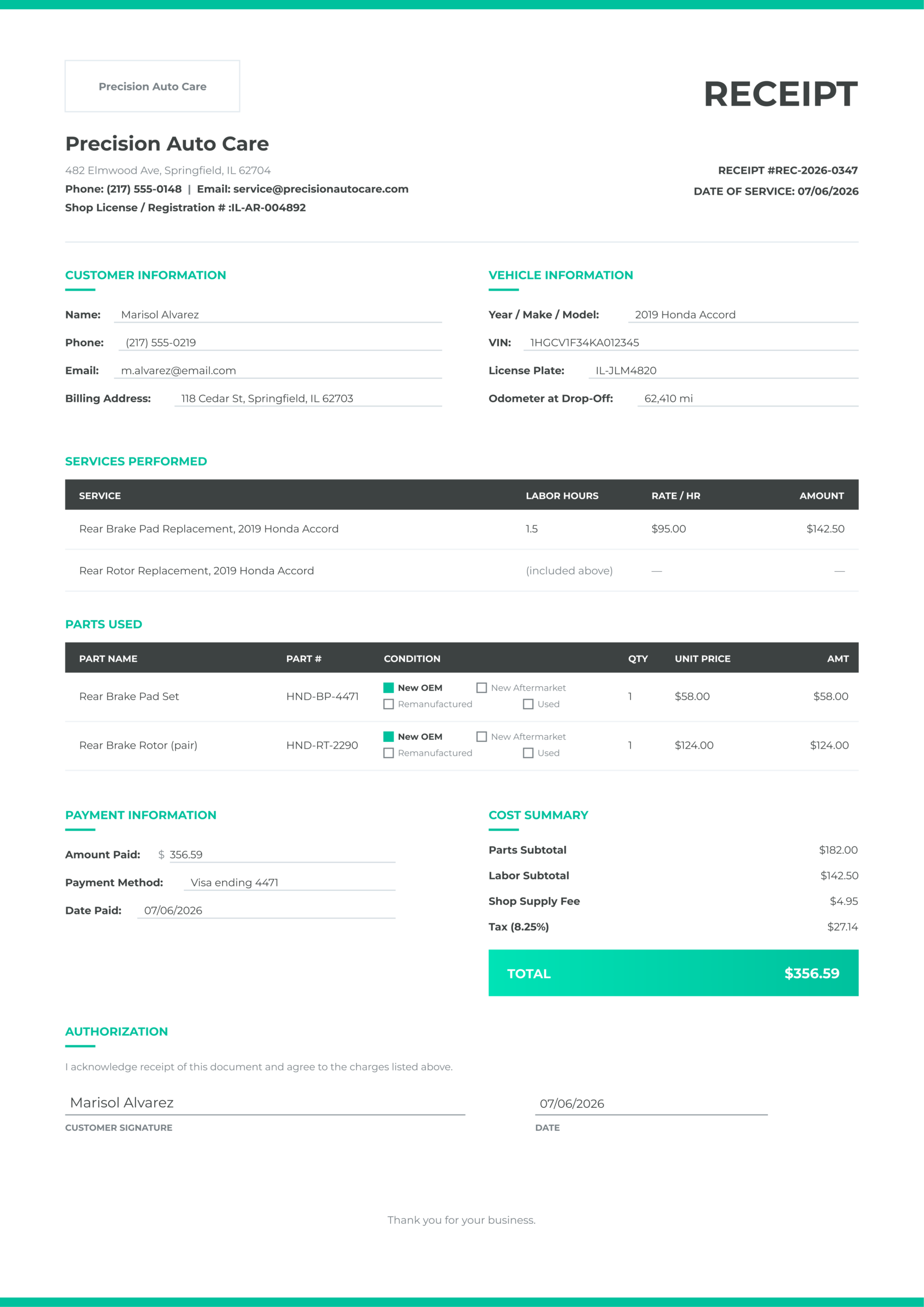
What each section shows in a real scenario
Parts are marked New OEM rather than just “brake parts,” which matters for a warranty claim. And the service name specifies “Rear Brake Pad Replacement” rather than “brakes,” specific enough to hold up if a customer later disputes which axle was serviced.
Receipt Templates for different shop types
General repair shop receipt
The nine base fields apply everywhere. A few shop types just need extra fields layered on top.
Tire shop receipt
When building a receipt for the tire shop, you’ll need to add a few extra fields:
- Tire size, brand, and model
- Speed rating
- Load index
- TPMS sensor status (replaced or not)
- Tire disposal fee as its own line item; some states require that the fee be itemized separately.
Body shop and mobile mechanic receipts
Body shops, on the other hand, should add the
- OEM paint code
- Pre-existing damage notation (free text documenting damage already there before work began)
- Panel condition (OEM replacement / Aftermarket / Repaired)
- If insurance is paying, the claim number and adjuster name.
Mobile mechanics should add the service location address (where the vehicle was actually worked on, not your shop’s address) and a technician’s license number, if your state requires one.
Avoid running one universal template regardless of job type, so fields end up blank because they never applied to it. Keep one base template and one variant per shop type instead.
State-specific receipt requirements
States with formal automotive repair acts and what they require
A handful of states have statutes spelling out exactly what belongs on a receipt. Treat this as a starting point, not a substitute for checking your state agency directly; requirements get amended.
State | Governing Law | Key Receipt Requirements | State Agency |
California | Bureau of Automotive Repair, 16 CCR 3356 | Dealer registration number on the invoice; parts itemized with condition (new/used/rebuilt/OEM/aftermarket); services listed separately with pricing; subtotal shown | |
New York | DMV Motor Vehicle Repair Shop Regulations, Part 82 | Registered repair shop; final bill can’t exceed the written estimate without customer consent; phone authorizations must record date, time, and who authorized it | |
Florida | Florida Motor Vehicle Repair Act, F.S. 559.911 | Itemized invoice showing labor, parts, and costs; parts condition disclosed; shop registration number included; invoice must match the authorized estimate | |
Texas | Texas Deceptive Trade Practices Act (no dedicated repair statute) | No formal itemization mandate, but itemized authorization is the standard consumer-protection expectation | |
All other states | Varies by state agency | No specific automotive repair act in most states | State DMV or Attorney General’s office |
What to do if your state has no specific requirement
The federal Magnuson-Moss Warranty Act still requires written documentation of any warranty work regardless of state. A receipt covering all nine fields above satisfies both that federal standard and every state-level requirement that does exist. But don’t assume your base template is compliant everywhere. Check your state’s motor vehicle or consumer protection agency site once a year and compare its requirements against your template.
Paper, Excel, PDF, or Software: which format works for your shop
Format | Best For | Limitation |
Paper/carbon pad | Mobile mechanics, under 5 jobs/day | No digital record |
Printable PDF | Shops wanting a digital copy, no subscription | Still manual entry |
Excel / Google Sheets | 5–20 jobs/day, want auto-calculated totals | No customer delivery automation |
Shop management software | 20+ jobs/day | Requires a subscription |
Paper and printable PDF: right for which shops
Paper and carbon pads work if you’re doing fewer than five jobs a day and want a physical copy with zero setup: the tradeoff is no digital record. A printable PDF is a step up: fill it in digitally and print it for a digital file without a software subscription.
Excel/Google Sheets: right for which shops
Once you’re doing 5–20 jobs a day, Excel or Google Sheets earns its keep, with auto-calculated totals and a digital record without a monthly bill.
Shop management software: when to make the switch
Past 20 jobs a day, auto repair invoicing software is worth it. It helps generate the receipt straight from the approved estimate with no re-entry, then sends it by email or SMS with a payment link built in. If end-of-day reconciliation takes more than 30 minutes because you’re manually cross-checking totals across files, then it’s time to move away from Excel.
Going digital: automating receipts from estimate to payment
How shop management software generates receipts automatically
The customer approves an estimate by text. Then the technician completes the work and the auto repair invoicing software converts the approved estimate into a receipt automatically. And the receipt goes out with nobody re-typing a single line of service or parts data.
Digital delivery: email, SMS, and payment links
The receipt reaches the customer by email or SMS with a payment link attached. They pay, and the payment is recorded and archived without a separate follow-up message. But don’t simply email a receipt as plain text in the body of a message. That has no real standing as a document. Send it as a PDF attachment or a link to a formatted digital receipt the customer can download and keep.
Digital signatures and record-keeping
Attaching digital vehicle inspection photos to the receipt adds another layer of protection. If a customer later claims they didn’t authorize a repair, before-and-after photos showing the condition that made the repair necessary are hard to argue with.
How a proper receipt protects your shop from disputes and chargebacks
What a credit card chargeback looks like for a shop
A chargeback usually plays out like this: a customer pays by card and then disputes the charge 30–60 days later, claiming “services not rendered” or “services not as described.” You typically get 7–10 days to respond with documentation, and a properly completed receipt is your best evidence.
Which receipt fields matter most in a dispute
Four fields matter most:
- Authorization signature (proves the customer approved the work)
- Itemized service and parts lines (proves what was done)
- The VIN (proves it was their vehicle)
- The date of service (proves when it happened).
Missing any of these makes your response noticeably weaker.
Documentation habits that close disputes faster
A payment terminal printout won’t save you. It shows the total charged and nothing else: no service description, no parts, no VIN, and no signature. If insurance is involved, it’s also worth understanding how insurance for auto repair shops interacts with your documentation requirements.