







Boost your shop sales
Simplify shop management
Empower your technicians
If you’re shopping for the best professional OBD2 scanner for your shop, you already know the stakes. The wrong tool means more diagnostic dead ends, slower bay turnover, and technicians falling back on guesswork. This guide skips the spec sheet rundown you’ll find everywhere else and gets straight to what matters for a working shop: which scanners handle the real diagnostic load, which features are worth paying for, and how to match a tool to your specific service mix.
We’ll walk through five scanners covering entry-level professional through flagship dealer-level capability, plus a framework for matching the right one to your shop’s volume and vehicle mix.
What makes a professional OBD2 scanner different from consumer tools
The diagnostic capability gap
A consumer-grade scanner reads codes and clears them. That’s the entire job. A professional scanner does that and then goes further: it sends commands back to the vehicle’s modules, runs guided diagnostic routines, and accesses manufacturer-specific data layers that generic OBD2 protocols don’t expose. The gap is the difference between confirming a part has failed and guessing that it might have.
What shops lose by using consumer-grade tools
So, if a tech is chasing an ABS fault with a code reader that only pulls and clears codes without bidirectional control, there’s no way to run the pump motor or cycle a solenoid to confirm which component actually failed. As a result, the diagnosis turns into trial-and-error parts replacement, taking an hour or more in labor and carrying a risk of a comeback.
The same problem shows up with a TPMS relearn after a tire rotation: a basic tool can’t initiate that procedure at all. But be careful. A label that says “professional” on retail packaging doesn’t guarantee shop-grade capability. Check what the tool can actually command, not what the box claims.
5 Features auto repair shops must prioritize in a professional OBD2 scanner
Before comparing individual models, it helps to know what separates the best OBD2 scanner for mechanics from a tool that just looks capable on paper. These five features determine whether a scanner earns a permanent spot on your bay cart.
Bidirectional Controls and Actuator Testing
Bidirectional control means the scanner sends a command to the ECU instead of only reading data back from it. A fuel injector actuator test, for example, lets you confirm a suspected injector failure before ordering the part, turning a guess into a verified diagnosis.
Protocol coverage for your vehicle mix (CAN, EOBD, JOBD)
Protocol coverage determines which vehicles a scanner can actually talk to at a system level: domestic vehicles run on CAN, European models need EOBD, and Japanese imports need JOBD. Picking a scanner based on display quality and price while ignoring protocol coverage is the most predictable source of buyer’s remorse in mixed-fleet shops; a tool missing EOBD support simply can’t fully diagnose European vehicles, no matter how good the price looks.
Manufacturer-specific code access vs generic OBD2
Generic codes get you in the door, but manufacturer-specific codes and live data parameters are what let you pinpoint a fault inside a specific system instead of a general category.
Software update access and frequency
A scanner is only as current as its last update. Check how often the manufacturer pushes new vehicle coverage and functions before committing to a platform.
Wireless connectivity and build durability for shop use
A scanner that survives a shop floor, dropped tools, greasy hands, and daily use and connects reliably over Bluetooth or Wi-Fi saves more time over a year than a marginally faster processor ever will.
The best professional OBD2 scanners for auto repair shops (2026)
If you’re evaluating which professional OBD2 scanner is worth the investment for your bay, here’s how the top picks for 2026 stack up, verified against current manufacturer pricing and specs.
Autel Maxisys Elite II Pro: Best high-end 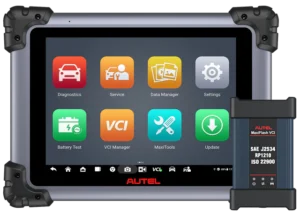
This is the right call for a European specialist or any general shop that regularly takes on jobs other shops turn away. The Elite II Pro’s J2534-compliant ECU programming and coding put it in a different tier, with full bidirectional active tests across all systems, plus CAN FD and DoIP support for late-model vehicles. Take an ADAS calibration after a windshield replacement or a module coding job after a BCM swap: both require OE-level programming access a mid-range scanner doesn’t have, and without it, the job gets referred to a dealer.
Expect to pay around $2,000–$2,600 for the Autel Maxisys Elite II Pro unit, plus roughly $650/year once the included two-year free update period ends.
Launch X431 Pro 5: Best high-end alternative

For shops weighing a second high-end option against Autel, the Pro 5 delivers comparable depth: J2534 ECU programming, full bidirectional control, online OEM coding, and CAN FD/DoIP support, built around Launch’s topology mapping for faster module-level fault isolation. It covers 200+ vehicle brands and suits shops that want OE-level reprogramming without committing to a single-brand ecosystem. Where it trails the Elite II Pro slightly is the depth of US-market OEM-specific functions on some domestic platforms.
Pricing runs roughly $1,400–$2,000 depending on the bundle, with annual software renewal in a similar range to its Autel counterpart.
Autel Maxicom MK908P: Best mid-range

The MK908P (sold currently as the MK908 Pro II) is the right call for a general repair shop that wants real diagnostic depth, bidirectional control, J2534 ECU coding, and CAN FD/DoIP support without flagship pricing. It covers 150+ vehicle brands and handles the repairs that drive most comebacks: ABS bleeds, SAS calibrations, and injector coding included. Where it stops: its OEM-level reprogramming reach on European luxury brands is narrower than the Elite II Pro’s, so a shop doing heavy BMW or Mercedes module work will eventually outgrow it.
Expect to pay around $1,500–$1,800 for the unit, with one year of free updates included and roughly $400–$600/year after that.
Autel MaxiCheck MX808S: Best entry-level professional
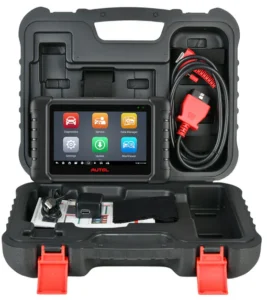
This is the entry point for a shop buying its first true professional scanner. The MX808S covers OE-level all-system diagnostics and real bidirectional control, not just code reading, across 28+ service functions, including oil resets, ABS bleeds, and injector coding. It’s a genuinely capable starting tool, but it stops short of J2534 ECU programming and CAN FD/DoIP support, so it won’t handle the late-model European reprogramming jobs the higher tiers can. For a shop in its first 12 months of offering professional-level diagnostics, that’s a reasonable trade-off.
Pricing runs around $400–$560, with one year of free updates included.
BlueDriver Bluetooth Pro: Best wireless option
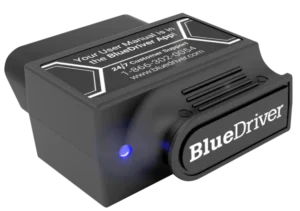
BlueDriver fills a narrow but real niche: a low-cost, no-subscription tool for quick code pulls, enhanced ABS/SRS/transmission diagnostics, and repair-report lookups, all run from a phone. It’s genuinely useful as a quick second scanner at the service desk or for verifying a code before committing a bay to a full diagnostic. The common mistake is treating it as a primary shop scanner; it has no true bidirectional control, its service “resets” are instruction-based walkthroughs rather than active commands sent through the OBD2 port, and it can’t touch ECU programming.
At roughly $80–$130 with zero ongoing software cost, it’s a smart supplement, not a replacement for a professional-grade tool.
Scanner | Best For | Bidirectional | J2534/ECU Coding | Protocol Coverage | Unit Price | Annual Update Cost |
|---|---|---|---|---|---|---|
Autel Maxisys Elite II Pro | Best high-end | Full bidirectional active tests across all systems | J2534-compliant ECU programming and coding | CAN FD and DoIP | $2,000–$2,600 | ~$650/year (after 2-year free period) |
Launch X431 Pro 5 | Best high-end alternative | Full bidirectional control | J2534 ECU programming, online OEM coding | CAN FD/DoIP | $1,400–$2,000 | ~$650/year (after 2-year free period) |
Autel Maxicom MK908P | Best mid-range | Bidirectional control | J2534 ECU coding | CAN FD/DoIP | $1,500–$1,800 | $400–$600/year (after 1 year free) |
Autel MaxiCheck MX808S | Best entry-level professional | Real bidirectional control | None — stops short of J2534 programming | No CAN FD/DoIP | $400–$560 | 1 year free updates included |
BlueDriver Bluetooth Pro | Best wireless option | No true bidirectional control | None | Not specified | $80–$130 | $0 (no ongoing software cost) |
Whichever scanner you land on, pair it with solid automotive service and repair reference resources. A scan tool tells you what’s wrong, but you’ll still need accurate spec and procedure data to fix it correctly.
How to match a scanner to your shop’s service volume
Picking the best professional automotive diagnostic scanner for your shop starts with being honest about your service mix and volume, not just your budget. Three profiles cover most shops:
High-volume general repair (5+ cars/day): You need processing speed and broad protocol coverage above all else, a scanner that moves through AutoScan routines quickly and handles CAN, EOBD, and JOBD vehicles without swapping tools.
European or import specialist: Deep EOBD/JOBD coverage and OEM-level reprogramming functions matter more than raw speed here, since these vehicles demand manufacturer-specific access that generic tools can’t reach.
Growing shop buying its first professional tool: You need feature depth at a sustainable entry price, enough capability to stop turning away diagnostic work, without overpaying for reprogramming functions you won’t use in your first 12 months.
If your shop fits profile one or two, start with the Elite II Pro or MK908P above. If you’re in profile three, the MX808S is your entry point.
A scanner is only one piece of the investment. So it’s worth thinking about shop floor layout and equipment planning and other major shop equipment investments alongside it, since bay efficiency and tool capability work together.
Connecting OBD2 scanner data to your diagnostic workflow
A scan result is the start of a diagnosis, not the end of one, and shops that get the most from vehicle diagnostics treat it that way. Here’s the sequence to follow:
- Identify the DTC
- Confirm it with live data
- Document the finding with photo or video evidence in a digital vehicle inspection
- Build the estimate from confirmed findings instead of a verbal code description.
Take a P0420 catalyst code. Live O2 data confirms the converter is actually degrading. Then the technician documents that evidence in the DVI, and the customer approves the estimate from photo proof rather than taking your word for it, eliminating the most common source of estimate disputes.
Shops connecting inspection findings to repair order documentation see average repair order values climb by roughly 20–40%, and the right shop diagnostic and workflow apps make that connection automatic instead of manual.
The bottom line
The right scanner for your shop comes down to matching capability to what you actually repair, not chasing the longest feature list. Whether that’s a flagship unit for European reprogramming or an entry-level professional tool you’ll grow into, the best scan tool for mechanics is the one that matches your service mix and pays for itself in fewer comebacks and faster diagnoses.
Once the hardware’s right, connecting that diagnostic data to your estimates and customer communication through auto repair shop management software is what turns a good scanner into a genuine shop advantage.